Showing posts with label #HTML&CSS. Show all posts

Sunday, November 28, 2021

how we insert inline and block element in HTML

<!DOCTYPE html>
<html>
<head>
<title>inline and block element</title>
</head>
<body>
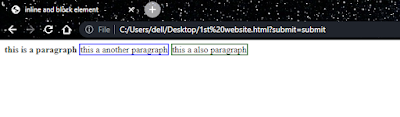
 <strong style="border: 2px sloid red;">this is a paragraph</strong>
 <a style="border: 2px solid blue;">this a another paragraph</a>
 <span style="border: 2px solid green;">this a also paragraph</span>

</body>
</html>

output:


How we insert form in HTML

<!DOCTYPE html>
<html>
<head>
<title>Form in HTML</title>
</head>
<body>
<form>
<label>username:</label>
<input type="text" placeholder="Enter your username">
<hr>
<label>password:</label>
<input type="password" placeholder="Enter your password">
<hr>
<label>Email id:</label>
<input type="text" placeholder="Enter your Email">
<hr>
<label>Number:</label>
<input type="number" placeholder="Enter your number">
<hr>
<label>Date:</label>
<input type="Date" placeholder="Enter Date">
    <select>
    <option>slecet your plane</option>
    <option value="cs">cs</option>
    <option value="se">se</option>
    </select>
    <hr>
    <textarea cols="30" rows="5"></textarea>
    <hr>
    <p>select your gender</p>
    <input type="radio" name="gender">male
    <input type="radio" name="gender">female
    <hr>
    <input type="checkbox">i read it carefully
    <hr>
    <input type="submit" name="submit" value="submit">
</form>
</body>
</html>
output:


how we insert table in HTML

 <!DOCTYPE html>

<html>

<head>

<title>Table in html</title>

</head>

<body>

<table table border="1" cellspacing="0" cellpadding="10" style="text-align:center;">

<thead>

<tr>

<th>Name</th>

<th>reg.no</th>

<th>subject</th>

</tr>

</thead>

<tbody>

<tr>

<td>hamza rehman</td>

<td>4718</td>

<td>data structure</td>

</tr>

<tr>

<td>hassan rehman</td>

<td>4345</td>

<td>assembly language</td>

</tr>

</tbody>

</table>

</body>

</html>


output:


How we insert List in HTML

<!DOCTYPE html>
<html>
<head>
<title>List in HTML</title>
</head>
<body>
THIS IS method of insert UNORDERED LIST
<ul type="square">
<li>this is first</li>
<li>this is second</li>
<ul>
<li>this is 1</li>
<li>this is 2</li>
<li>this is 3</li>
</ul>
<li>this is third</li>
</ul>
THIS IS method of insert ORDERED LIST
<ol>
<li>this is first</li>
<li>this is second</li>
<ol>
    <li>this is 1</li>
<li>this is 2</li>
<li>this is 3</li>
</ol>
<li>this is third</li>
</ol>
</body>
</html>

output:


how we insert link and image in HTML

<!DOCTYPE html>

<html>

<head>

<title>links and images</title>

</head>

<body>

<button> <!--button tag used for insert a button-->

<a href="https://hrcoding.blogspot.com" target="-blank" style="text-decoration: none;" title="click to visit">HR programming knowledge</a>

</button>

<!--this is used for insert link in html-->

<img src="asm.jpg" alt="assembly language"> 

<!--this is used for insert image in html-->

</body>

</html> 


output:


Headings and paragraph in HTML

<!DOCTYPE html>
<html>
<head>
<title>Headings and paragraphs in HTML</title>
</head>
<body>
<h1>this is first heading </h1>
<h2>this is second heading </h2>
<h3>this is third heading </h3>
<h4>this is fourth heading </h4>
<h5>this is fifth heading </h5>
<h6>this is sixth heading </h6>
<!-- there are six headings in html-->
<p>this is our paragraph</p>
<strong>this is used for bold the paragraph</strong>
<br>
<b>this is also used for bold the paragraph</b>
<br>
<em>this is used for itelic the paragraph</em>
<br>
<i>this is also used for itelic the paragraph</i>
<hr> <!--this is used for creating horizontal row-->
<br> <!--this is used for creating the newline-->
</body>
</html>

output:


how we use mete tags in HTML

<!DOCTYPE html>
<html>
<head>      <!--in a head tag we can  use different mete tags-->

<meta name="description" content="this is a description">
<!--this mete tag is used for give description in our website-->

<meta name="keywords" content="c++ tutorial,web development">
<!--this mete tag is used when you want when people search about c++ tutorial,web             development than search engine show your website link.-->

<meta name="robots" content="noidex,nofollow">
    <!--this mete tag is used when you want that search engine cannot index and follow our website.-->
<title>Mete tages</title>
</head>
<body>
</body>
</html>

Basic Structure of HTML

<!DOCTYPE html> 
<html>    <!--html tag-->
<head>    <!--head tag-->
<title>page name</title>    <!--title tag-->
</head>   <!--end head tag-->
<body>    <!--body tag-->
 this is the body of html

 <!--this is a method of writing a comment in html-->

</body>    <!-- end body tag-->
</html>    <!--end html tag-->


output: